AI Assistant
Pro plan. Available on Pro and above, during the free trial, and in every self-hosted install. Connect your own API key (BYOK) or use a server-configured provider.
Sitepins features a multi-provider AI assistant integrated across every stage of your workflow — from rich text drafting and inline ghost-text completions to code editing in Monaco, commit message generation, and SEO auto-fixes.
Sitepins doesn’t resell AI tokens or mark up API calls. You bring your own API key (BYOK) from any supported provider, stored securely in your browser.
Connect a Provider
Open AI Agent from the account menu, or search for it with Cmd+K / Ctrl+K.
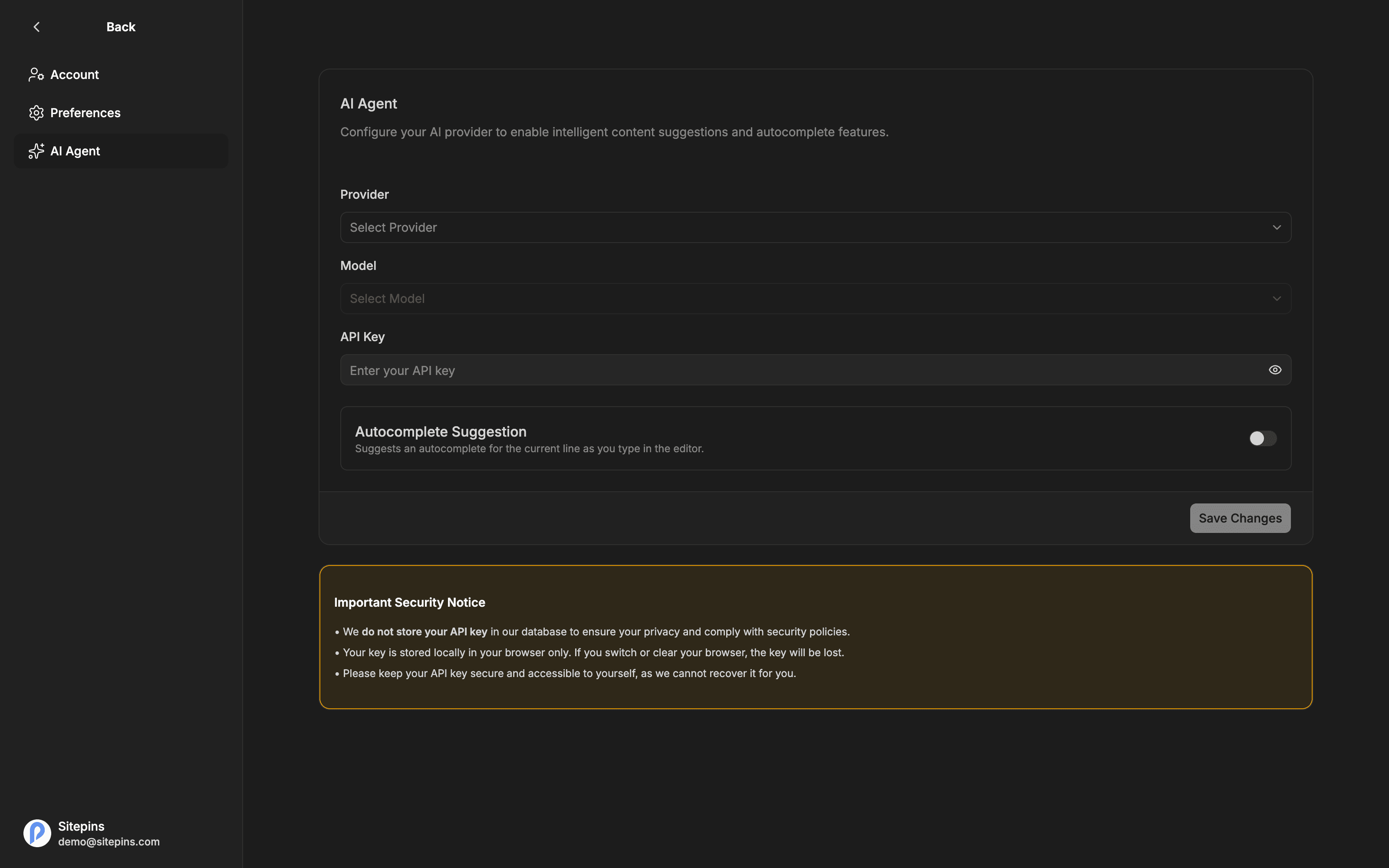
- Choose a Provider
- Choose a Model from the preset list, or select Enter manually and type any custom model ID
- Paste your API Key
- Configure your preferred feature toggles
- Click Save Changes
Supported Providers
Sitepins natively supports 6 AI providers:
| Provider | Default / Preset Models | Where to get a key |
|---|---|---|
| Groq (Ultra-Fast & Free) | openai/gpt-oss-120b, openai/gpt-oss-20b, qwen/qwen3.8-27b, qwen/qwen3.6-27b | console.groq.com/keys |
| OpenRouter (Free & All LLMs) | meta-llama/llama-3.3-70b-instruct:free, google/gemini-2.0-flash-exp:free, deepseek/deepseek-r1:free, mistralai/mistral-small-24b-instruct-2501:free, qwen/qwen-2.5-coder-32b-instruct:free, anthropic/claude-3.7-sonnet, openai/gpt-4o-mini | openrouter.ai/keys |
| OpenAI (ChatGPT) | gpt-5.5, gpt-4.1, gpt-4o-mini | platform.openai.com/account/api-keys |
| Google (Gemini) | gemini-3.5-flash, gemini-3.1-flash-lite | ai.google.dev/gemini-api/docs/models |
| Anthropic (Claude) | claude-opus-4-8, claude-sonnet-4-6, claude-haiku-4-5 | console.anthropic.com |
| xAI (Grok) | grok-4-1, grok-4-1-fast-non-reasoning, grok-4.20-non-reasoning | console.x.ai |
If the exact model you want is not listed in the preset dropdown — such as a newly released checkpoint or fine-tuned model — choose Enter manually and type the model ID.
Where Your Key Is Stored
Your personal API key is stored in your browser’s local storage (localStorage). It is never written to the Sitepins database, never logged, and never shared with other teammates or organization members.
- Use Delete Key at any time to remove your key immediately.
- Because keys live in browser storage, clearing your browser cache or switching devices requires entering your key again.
- Teammates bring and manage their own keys, keeping usage and billing cleanly separated.
Server Fallback Keys (Self-Hosted & Hosted)
For self-hosted instances or platform setups, administrators can configure server-wide fallback environment variables:
AI_PROVIDER="groq"
AI_MODEL="openai/gpt-oss-120b"
AI_API_KEY="gsk_..."
When server keys are configured, users can use AI features immediately without entering a personal key. If a user enters their own personal API key in AI Agent settings, their personal key always takes precedence.
AI Capabilities
Sitepins integrates AI throughout the entire application:
1. Rich Text Editor Assistant
When editing Markdown or MDX documents in the visual editor:
- Type / and choose AI from the slash command menu
- Select any text block to reveal the floating toolbar and click Ask AI
- Or press Mod+J (Cmd+J on macOS, Ctrl+J on Windows/Linux)
Available Commands:
- Ask AI anything: Submit any freeform prompt or instruction.
- Writing: Continue writing, Improve writing, Fix spelling & grammar, Make longer, Make shorter, Simplify language, Emojify.
- Understanding: Explain content, Add a summary, Insert inline comments.
- Generating: Generate Markdown or MDX samples.
Reviewing Generated Content:
Before applying any change to your document, Sitepins gives you full control:
- Accept: Apply the change to your document.
- Discard / Reject: Throw away the generation.
- Try again: Regenerate with fresh output.
- Insert below: Append the output beneath the current block instead of replacing it.
- Replace selection: Swap the highlighted text with the new output.
2. Autocomplete Suggestions (Copilot)
Turn on Autocomplete Suggestion in AI Agent settings to receive real-time, inline ghost-text continuations as you draft.
- Press Tab to accept a suggestion.
- Keep typing to ignore and dismiss it.
- Autocomplete uses small, frequent requests. If you prefer to preserve API credits or avoid distraction while drafting, you can toggle it off independently without affecting other AI tools.
3. Monaco Code Editor AI Copilot
When working in the Code Editor on templates, styles, components, or configuration files:
- Press Cmd+I (macOS) or Ctrl+I (Windows/Linux) — or click the AI copilot button on the editor toolbar — to summon the floating inline AI prompt widget.
- Inline Code Edits & Refactoring: Instruct the model to refactor code, fix bugs, add TypeScript types, or convert styling.
- Explain Code: Highlight a complex function or regex and ask the AI to explain its logic.
- Interactive Diff Review: The editor renders an inline diff showing green additions and red deletions. Accept (Cmd+Enter) or discard (Esc) before saving.
4. Commit Message Generator
When committing changes to Git (with Custom Commit Messages enabled):
- The commit modal features a Generate with AI button.
- The AI inspects your file diffs and automatically generates a standard conventional commit message (e.g.
feat(blog): add author bio block) along with an optional bulleted description of changes. - Review or tweak the message before confirming your commit.
5. AI-Powered SEO Tools
In the SEO Tools panel:
- Auto-Generate Metadata: Click 1-click generation to draft an optimized SEO title, meta description, and keywords based on your page content.
- AI Auto-Fix: When the SEO analysis flags an issue (e.g., meta title too long, missing description, poor keyword density, or readability concerns), click Auto-Fix with AI to instantly generate an optimal revision and apply it.
6. Dual-Mode Global Search & CMS Copilot
In Global Search (Cmd+K / Ctrl+K):
- Search Mode: Instantly search files, organizations, settings, and pages.
- Conversational CMS Copilot: Toggle into the inline AI Copilot panel to chat with a streaming assistant that understands your project’s active framework (Astro, Hugo, Next.js), config files, collections, and code structure. Ask questions, draft snippets, or explore your site architecture with full conversation retention until closed.
Granular Feature Toggles
You have full control over where AI is active. In AI Agent settings (/dashboard/ai-agent), you can independently toggle 6 switches:
- Autocomplete Suggestion (
sitepins-ai-autocomplete): Inline ghost-text continuations as you type. - Editor AI Assistant (
sitepins-ai-editor): Floating toolbar Ask AI and slash commands in the visual editor. - Code Editor AI Assistant (
sitepins-ai-code): Monaco code editor inline copilot button, context menu, and Cmd+I shortcut. - Git Commit Generator (
sitepins-ai-commit): Conventional commit message and description generator in commit modals. - SEO & Metadata Assistant (
sitepins-ai-seo): 1-click frontmatter autofill and SEO Doctor recommendations. - Search AI / CMS Copilot (
sitepins-ai-search): Conversational Copilot chat within global search (Cmd+K).
All toggles default to ON and sync instantly across browser tabs. Turning a feature off cleanly hides its UI triggers and shortcuts without affecting the others.
Cost and Limits
Sitepins imposes no artificial quotas, token caps, or usage fees. All requests go directly to your chosen provider account at standard provider pricing:
- Providers like Groq provide generous free tiers and ultra-low latency inference.
- Models like
gpt-4o-miniandgemini-2.0-flashoffer extremely cost-effective performance for autocomplete and routine edits. - Advanced reasoning models like
claude-3-5-sonnetexcel at complex code refactoring and in-depth writing.
Troubleshooting
The AI menu opens the settings page instead of running. No provider or API key is configured yet — complete the setup steps above.
Requests fail immediately. Check that your API key is valid and has active credit/quota with your provider. If you entered a custom model ID manually, ensure your account has access to that specific model ID.
Your key disappeared. Keys are stored in browser localStorage. Clearing site data, switching browsers, or opening a private incognito session requires re-entering your key.