What Is Sitepins
Sitepins is a Git-based content editor for static site generators. It gives writers, marketers, and clients a visual interface for content that lives as Markdown, MDX, JSON, YAML, or TOML files in your repository.
Unlike a traditional CMS, Sitepins does not host or render your site. It doesn’t own your database, generate layouts, or dictate structure. It:
- Reads the content files already in your Git repository
- Overlays a visual editor on top of them
- Commits every change back to Git as an ordinary commit
Your repository stays the single source of truth. If you stop using Sitepins tomorrow, your content is exactly where it always was.
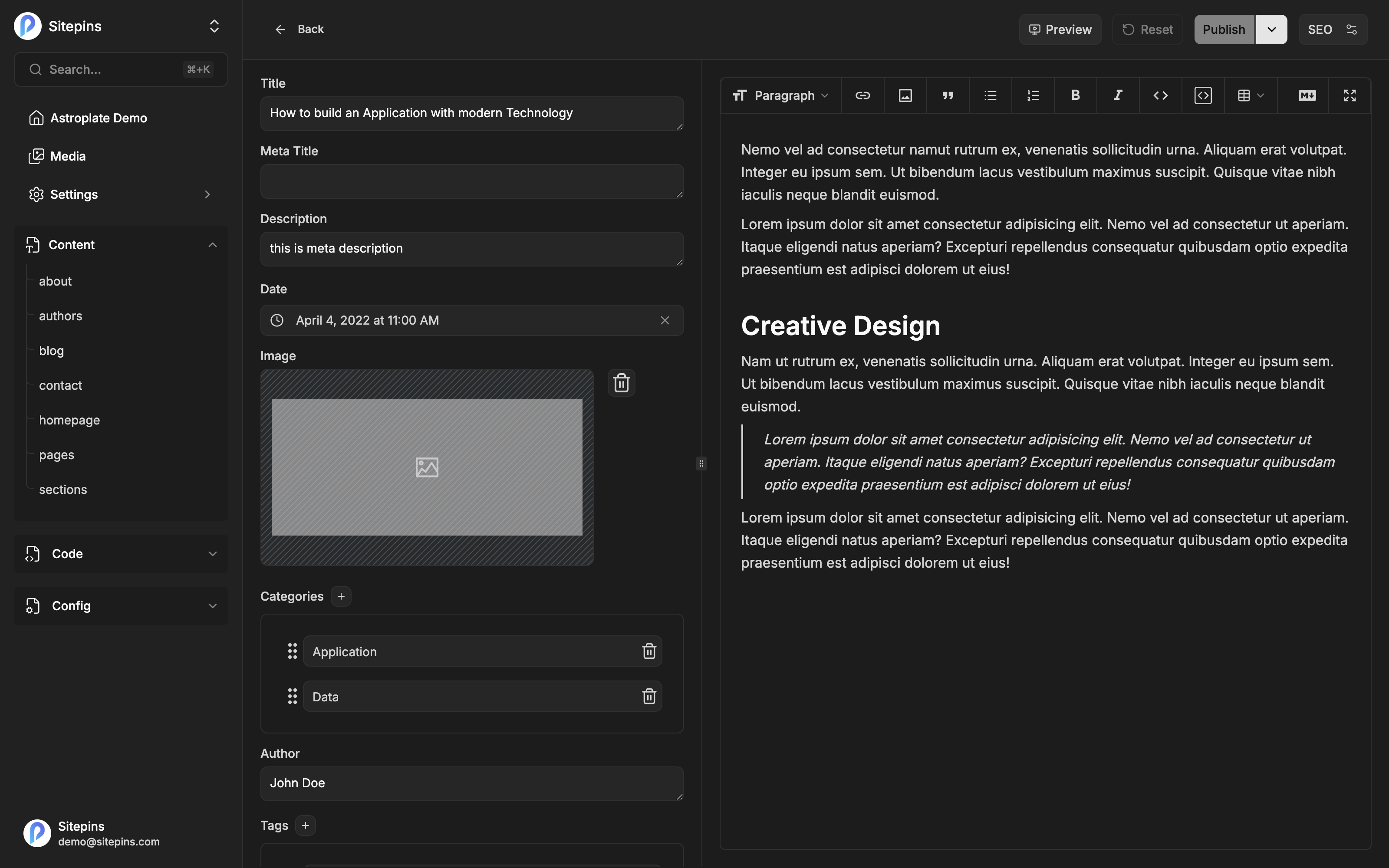
How It Works
- Connect a repository. Authorize Sitepins on GitHub or GitLab and pick a repo — or start from a template and let Sitepins fork one for you.
- Point it at your folders. Tell Sitepins where content, media, and config files live. It suggests sensible defaults for your framework.
- Edit. Your team writes in a visual editor, a raw Markdown view, or a code editor.
- Publish. Each save becomes a Git commit. Your existing pipeline — Vercel, Netlify, Cloudflare Pages, GitHub Actions — rebuilds the site exactly as it did before.
Sitepins never sits between your repo and your host. It just writes commits.
Key Features
For developers
- Git-native workflow. Every change is a commit, attributed to a real person, reviewable and reversible.
- No schema required to start. Sitepins reads your existing frontmatter and builds a form from it. Schemas are optional and come later, when you want tighter control.
- Multiple file formats. Markdown, MDX, JSON, YAML, and TOML.
- Shortcodes and components. Hugo shortcodes, MDX/JSX components, and raw HTML blocks round-trip through the editor without being mangled.
- Branches and pull requests. Work on a branch, open a PR or MR, and merge — without leaving Sitepins.
- Raw code editing. Drop into a full code editor for any file in the repo when the form isn’t enough.
For editors
- Visual and Markdown editing. Switch between a rich text editor and raw Markdown, with your cursor position preserved across the switch.
- Live preview. Watch your changes render in a real dev server before you publish anything.
- Media library. Upload, rename, move, and reuse images without touching the file system.
- SEO tools. A live search-result preview plus an analysis panel that checks titles, descriptions, links, headings, readability, and alt text.
- AI assistant. Bring your own key from OpenAI, Anthropic, Google, or xAI and generate, rewrite, shorten, or explain content inside the editor.
For teams
- Roles and permissions. Owner, admin, and editor roles control who can change settings, manage members, and publish.
- Invite by email. Teammates and clients don’t need a GitHub or GitLab account to edit content.
- Real-time collaboration. Live cursors with name labels, and avatars showing who else is in the file.
- Version history. Restore an earlier version or undo a commit from inside the app.
- 12 interface languages. English, Chinese, Japanese, German, French, Spanish, Portuguese, Russian, Korean, Indonesian, Vietnamese, and Bengali.
Supported Static Site Generators
Sitepins works with any generator that keeps content in files. It ships specific support for Astro, Next.js, Hugo, TanStack Start, Nuxt, SvelteKit, Eleventy, Jekyll, Gatsby, Remix, and Hexo.
Four of these are auto-detected when you connect a repository — Astro, Next.js, Hugo, and TanStack Start. Detection reads your config files and package.json and uses the result to suggest content and media folders. For every other generator you simply pick those folders yourself; nothing else changes.
Framework detection only affects folder suggestions and the live preview runtime. Editing, committing, and publishing work identically regardless of which generator you use.
Cloud or Self-Hosted
Sitepins comes in two editions built from the same codebase.
Sitepins Cloud (app.sitepins.com) is the hosted service. Nothing to run or maintain, with a free Hobby plan and paid tiers that unlock advanced features. See Plans & Limits.
Self-hosted is the open-source build you run yourself. It has no plans, no limits, and no billing — every feature is unlocked, including the ones marked Pro or Team throughout these docs. You supply a MongoDB instance, an S3-compatible bucket, and your own GitHub/GitLab apps. See Self-Hosting.
Throughout this documentation, features gated on Sitepins Cloud are marked like this:
Pro plan. Available on Pro and above, during the free trial, and in every self-hosted install.
Next Steps
Ready to start? Create your account, then connect a site.