Pro plan. The SEO panel is available on Pro and above, during the free trial, and in every self-hosted install. The target keyword and the advanced insights need the Team plan.
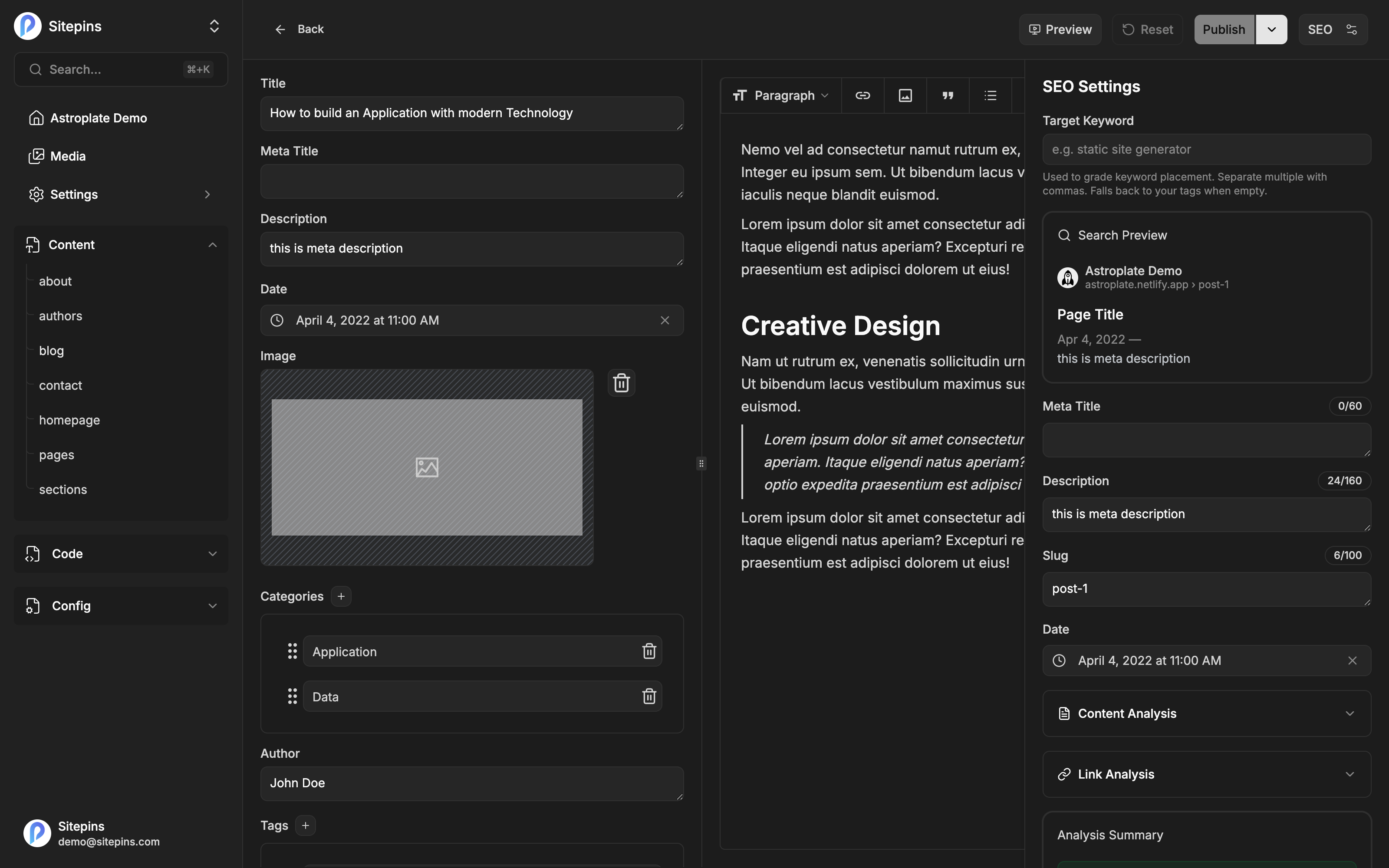
Click SEO in the editor header to slide open the SEO panel beside your content. Everything in it updates live as you write.
Search Preview
A Google-style preview of how the page will appear in results: your site’s favicon and name, the URL breadcrumb, the title, the date, and the description.
Descriptions are truncated at 160 characters in the preview, the same way search engines do it — so you can see the cut-off before it happens rather than after.
If the page has no meta description yet, the preview says so.
Target Keyword
Team plan. Available on Team and above, during the free trial, and in every self-hosted install.
Set the term you want this page to rank for. Separate multiple terms with commas; leave it empty and Sitepins falls back to your tags. It drives the keyword-related checks below — density, whether it appears in the title, the description, the slug, the first paragraph, subheadings, and image alt text.
The target keyword is stored in your browser, per file. It is deliberately not written into your frontmatter, so it never ends up in your published output. Note that it doesn’t travel between devices or teammates.
Editing the Slug
The panel includes the page’s slug, even for files that don’t have one in their frontmatter — in that case Sitepins derives it from the filename.
Change it and the rename is staged, not applied immediately. It happens as part of your next commit, so the content edit and the rename land in one commit. You’re redirected to the new URL afterwards.
SEO Fields
The panel surfaces the SEO-relevant fields from your frontmatter — title, description, and so on — with live character counters:
| Field type | Recommended length |
|---|---|
| Meta title | 60 characters |
| Meta description | 160 characters |
| Other fields | 100 characters |
Content Analysis
- Word count
- Reading time
Link Analysis
- Total links
- Internal links
- External links
Analysis Summary
Every check lands in one of three collapsible groups, each with a count:
- Good results — passing
- Improvements — worth a look, not wrong
- Issues — failing
Each row shows the current value, a length bar where relevant, and a specific recommendation.
Base checks
Available with the SEO panel:
- Meta title length
- Meta description length
- Word count (at least 300 words)
- Keyword density (0.5–3%)
- Heading and content structure problems
- Image alt-text coverage (at least 90% of images)
- Canonical URL present
- Structured data present
- Publication date within the last year
- Per-field length limits
SEO Insights
Team plan. Available on Team and above, during the free trial, and in every self-hosted install. On other plans you’ll see a locked row showing how many additional checks are available.
Twenty-one further checks covering readability, structure, and keyword placement:
Readability — readability score, sentence length, paragraph length, passive voice, transition words, repeated sentence openings, em dash overuse
Structure — heading structure, subheading distribution, table of contents, media count, slug length
Keyword placement — keyword in the first paragraph, in the title, in the description, in the slug, in subheadings, in image alt text
Title quality — contains a number, contains a power word, sentiment
The em dash check
This one flags writing that reads as AI-generated. It counts em dashes relative to sentences and warns when they’re overused:
Frequent em dashes (—) read as AI-generated. Prefer commas, parentheses, or splitting the sentence.
Roughly one em dash per ten sentences is fine; more than one per four is flagged.
What Gets Analyzed
Code blocks are excluded from every check — word counts, keyword density, readability, and the em dash count all ignore code. Frontmatter is analyzed as fields, not as body text.
Getting Alt Text Right
Alt-text coverage is one of the base checks, and it’s the one most pages fail. Click any image in the editor and add a caption or alt text. See Blocks & Embeds.
A Note on What This Is
The SEO panel is rule-based analysis, not an AI feature. It runs entirely on the content in front of you and needs no API key. The AI assistant is separate, and you can use either without the other.